Get Support on Slack
Join the Permit.io Slack community to ask questions, get help from the Permit team, and talk to other developers building with Permit.
AI-Powered Support
The Slack workspace has an AI support agent that answers questions from the Permit documentation. Ask it about:
- Code examples and SDK usage
- Policy configuration
- Troubleshooting common issues
- Quick technical questions
Post your question in any channel and the AI agent replies in the thread.
To trigger the agent again, tag @Permit.io AI Agent in your message.
Key Channels
Post in the channel that matches your question:
#permit-saas
Support for the Permit.io platform:
- Account and workspace setup
- API and SDK questions
- Policy modeling and enforcement
- Integration help
#opal
Discussion of OPAL (Open Policy Administration Layer), Permit's open-source project for keeping policy engines in sync with policy and data:
- OPAL architecture and deployment
- Troubleshooting OPAL issues
#general
General discussion about authorization, access control, and Permit.io:
- Best practices and patterns
- Community discussions
- Feature requests and feedback
- Non-technical questions
#announcements
Product news:
- Product updates and new features
- Release notes and version announcements
- Community updates
Slack Commands
Two custom commands help you manage support requests:
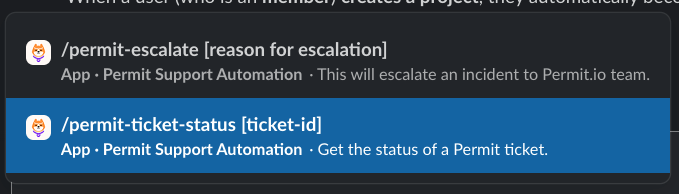
/permit-ticket-status
Check your support tickets from Slack:
- View all your open tickets
- Check the status of a specific ticket
- See updates on ticket progress
Usage: Type /permit-ticket-status to list your open tickets, or /permit-ticket-status [ticket-id] to check one ticket.
/permit-escalate - Pro/Enterprise Support Only
Escalate an issue to the Permit support team. This command:
- Creates a support ticket from your Slack message
- Routes the ticket to a Permit support engineer
- Works in private channels and DMs, not in public channels
Usage: Type /permit-escalate followed by a description of your issue.
Getting Started
- Join the Slack workspace
- Introduce yourself in
#general(optional) - Post your question in the relevant channel
- Ask the AI agent for quick answers